Flat Rate Shipping - Simple
Flat Rate Shipping allows you to define a standard shipping rate per item, per shipping class, or per order. On this page you’ll learn how to:
- Create and Configure standard flat rates
- Combine Flat Rates with Shipping Classes
- Configure advanced Flat Rates

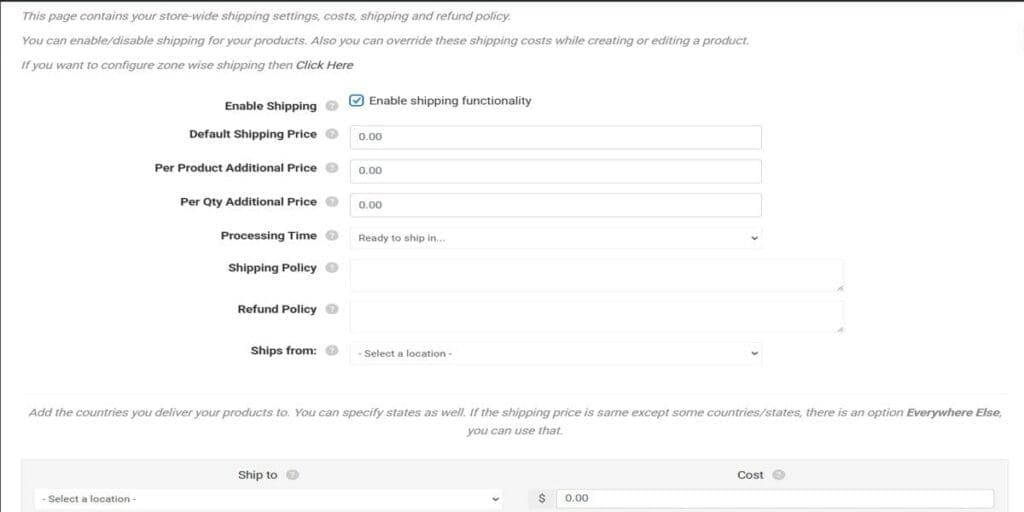
Go to vendor dashboard>Settings>Shipping Settings and click on the Click here as shown in the image. This will open up additional fields to complete.
ALWAYS double check that the shipping settings are calculating correctly for how you set them up. You will not be able to test the shipping while logged in as a seller so either log out and view as a guest or open an incognito window while logged in as a seller to complete your testing.
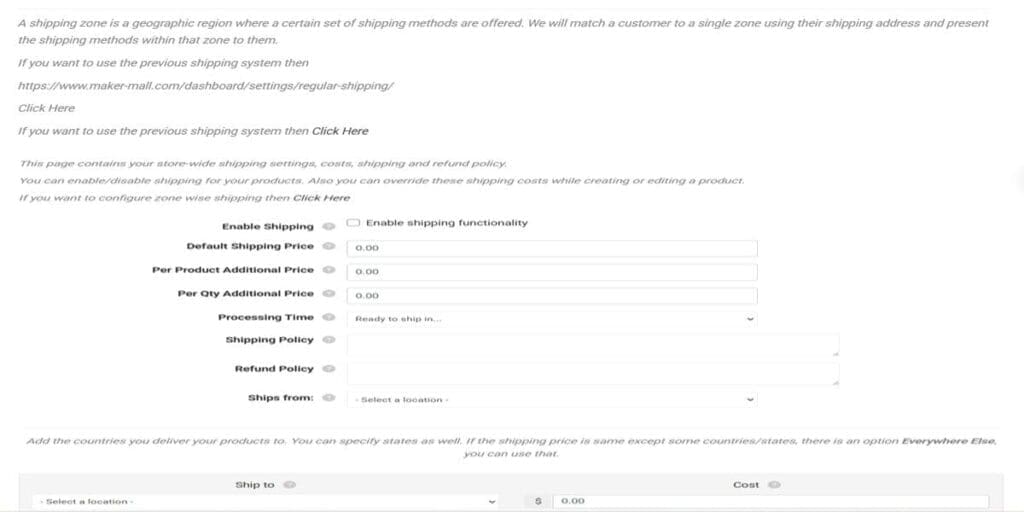
To use Flat Rate Simple Shipping Rates be sure to check Enable Shipping functionality box.
Set your rates in each field that applies to your product listing. Complete the remaining fields.
You can set different shipping costs per Different Countries and/or States using this method, however it will apply to ALL products listed in your storefront and the only way to set a different shipping fee for other products is to override the shipping settings in the individual product listing.